

How to Remove Windows Defender 2010 Rogue Anti-Spyware?
Windows Defender 2010 is malicious software which is a part of the rogue anti-spyware blackhat industry. Windows Defender 2010 has a similar name with Microsoft s reputable security tool called Windows Defender. Do not mix up these two programs. In fact, Windows Defender 2010 invades into your computer with the help of fraudulent social engineering, fake online advertisements and a variety of trojan-related techniques. Windows Defender 2010 modifies registry and creates some files to distort your OS (Operating System). Once active and running, Windows Defender 2010 keeps popping up annoying scan reports and persuades users to buy its full version to get rid of threats. The hackers like to use this trick to collect money. Remove Windows Defender 2010 as soon as you can if it always pops up.
Windows Defender 2010 Rogue Anti-Spyware Screenshot:
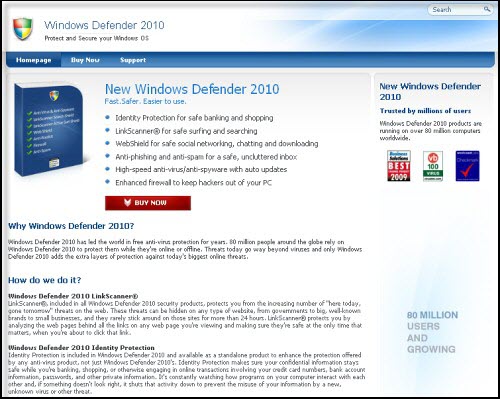
Note: If you are not proficient with computer, it is suggested that you backup your registry before manually removing Windows Defender 2010 Virus. And double check the entries that you are going to delete, or your computer can not work for missing some files.
So it is recommended to remove the virus automatically:
 |
Download Windows Defender 2010 Virus Removal Tool |  |
Windows Defender 2010 Virus Manual Removal
1. Restart your computer and keep pressing F8 Key before Windows launches. Use the arrow keys to select the “Safe Mode with Networking” option, and then hit ENTER Key to continue.

2. Open Task Manager and end the processes of Windows Defender 2010 Virus.

3. Click Start button and click Run
4. Type in regedit and run it.

5. Find and delete the following registry files of Windows Defender 2010 Virus:

HKEY_CURRENT_USERSoftwareWindows Defender 2010
HKEY_LOCAL_MACHINESOFTWAREMicrosoftWindowsCurrentVersionUninstallWindows Defender 2010
HKEY_LOCAL_MACHINESOFTWAREMicrosoftWindowsCurrentVersionRun “Windows Defender 2010″
6. Show all hidden files so as to completely delete Windows Defender 2010 Virus.

7. Click View tab and select Show files and folders and save the changes.

8. Search your hard disk and delete the following files Windows Defender 2010 Virus:
%Documents and Settings%All UsersDesktopWindows Defender 2010.lnk
%Documents and Settings%All UsersStart MenuProgramsWindows Defender 2010
How to Delete a Virus Manually
Please, be aware that manual removal of Windows Defender 2010 virus is a cumbersome task and can not always ensure complete removal of the malware, due to the fact that some files might be hidden or may get reanimated automatically afterwards. Moreover, lack of the required skills and even the slightest deviation from the instructions may lead to irreparable system damage. That is why it is strongly recommended automatic removal of Windows Defender 2010 virus, which will save your time and enable avoiding any system malfunctions and guarantee the needed result.
Automatic Windows Defender 2010 virus Removal:
This Automatic Windows Defender 2010 virus Removal Tool will fast and completely detect and delete all associated malicious components to save your time and hassle.
|
Download Windows Defender 2010 Virus Removal Tool | |

Related posts:

Step by Step Remove Pccareliveone.com Hijacker Guide | Spyware Removal Guides on April 25th, 2010
[…] of the misleading websites designed to promote one of the most aggressive rogue anti-spyware named Windows Defender 2010. The symptom of getting attacked by Windows Defender 2010 is that you are always redirected to […]